Logo WoW Forever Japanese

An addon for the Forever client Forever クライアント用アドオン

Play World of Warcraft®: Forever in Japanese World of Warcraft®: Forever を日本語で

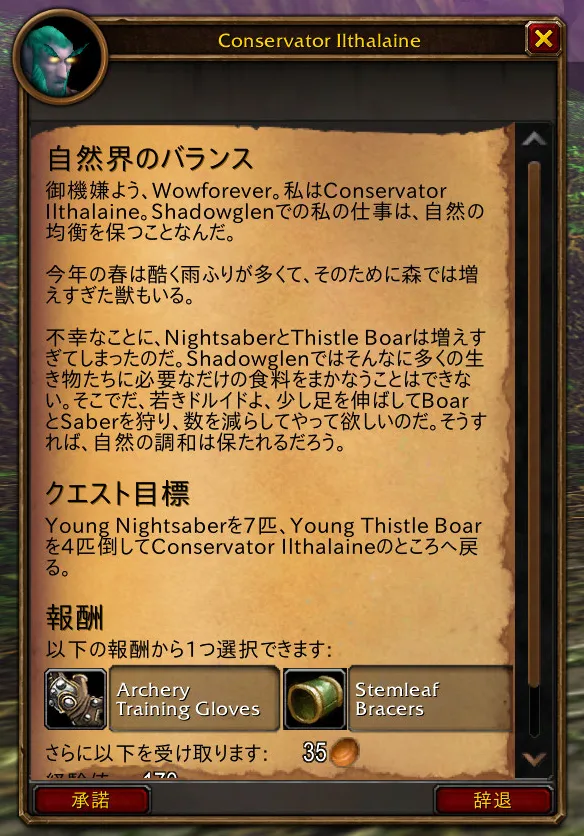
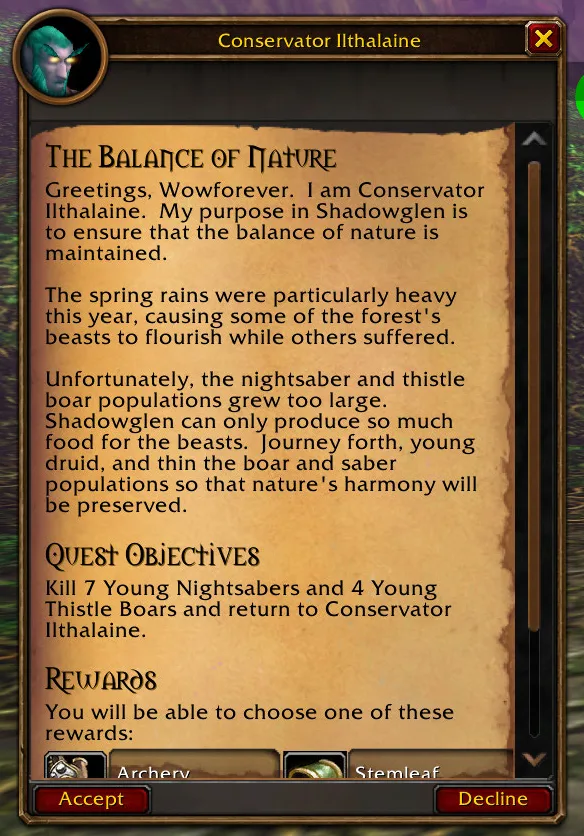
Quests, NPC dialogue, books, tooltips and the game's own windows, shown in Japanese. Hold Alt and the game's English comes back. Let go and the Japanese returns.

クエスト、NPC の会話、本、ツールチップ、ゲームのウィンドウを日本語で表示します。Alt を押している間はゲーム本来の英語に戻り、離すと日本語に戻ります。

Free and open source. Alt is only the default: you can pick any key in the settings. Names of people, places, creatures, items and spells stay in English. 無料のオープンソースです。Alt は初期設定のキーで、設定で好きなキーに変更できます。人物・地名・モンスター・アイテム・呪文の名前は英語のままです。

A quest window in Japanese: a quest from Shadowglen, with names such as Conservator Ilthalaine left in English The same quest window in the game's English
Drag the handle, or hold the button the way you hold Alt in the game. つまみを動かすか、ゲーム内で Alt を押すときと同じようにボタンを押し続けてください。

What it does できること

  • Quest windows and the quest logクエストウィンドウとクエストログ
  • NPC dialogueNPC の会話
  • Books and letters本と手紙
  • Item tooltipsアイテムのツールチップ
  • Spell tooltips呪文のツールチップ
  • The game's windows and buttonsゲームのウィンドウとボタン

Hold Alt to read the EnglishAlt で英語を表示

Wherever Japanese is showing, holding Alt shows the game's own English until you let go. Alt is the default. Any key can take its place: Ctrl, Shift, one side of either, a letter or a mouse button.

日本語が表示されているところでは、Alt を押している間だけゲームの英語が表示されます。Alt は初期設定です。Ctrl、Shift、左右どちらかの修飾キー、文字キー、マウスボタンなど、好きなキーに変更できます。
Names stay in English名前は英語のまま

Names of people, places, creatures, items and spells are never changed. What you read is what other players say and what guides call things.

人物・地名・モンスター・アイテム・呪文の名前は変わりません。ほかのプレイヤーや攻略情報と同じ名前のまま読めます。

Markers tell you what you are readingマーカーで状態がわかる

A line with no translation yet shows [未翻訳 / Not Translated] and stays in the game's English. A line whose English has changed since it was translated shows [要更新 / English Changed]. Either marker can be turned off.

まだ翻訳のない行は [未翻訳 / Not Translated] と表示され、英語のままになります。翻訳後に英語が変わった行には [要更新 / English Changed] が付きます。どちらも非表示にできます。

Popup dictionaryポップアップ辞書

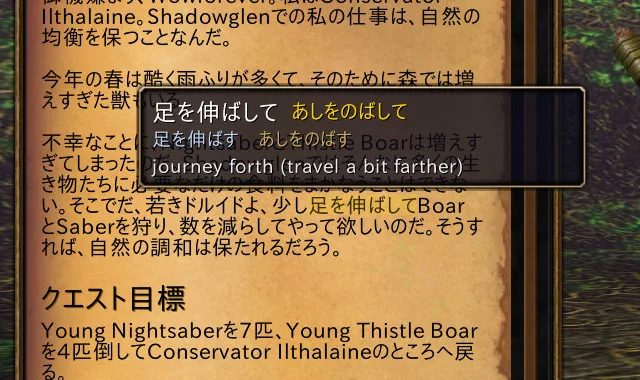
Point at a Japanese word in quest text, NPC dialogue, a book page or a window label. A small popup shows how to read it, its dictionary form, and a short English meaning of the word as the sentence uses it.

クエスト本文、NPC の会話、本のページ、ウィンドウのラベルで日本語の単語にマウスを合わせると、読み方・辞書形・その文脈での短い英語の意味が表示されます。

The popup dictionary above a word in a quest text, showing its reading and meaning

You choose what is translated翻訳する範囲を選べる

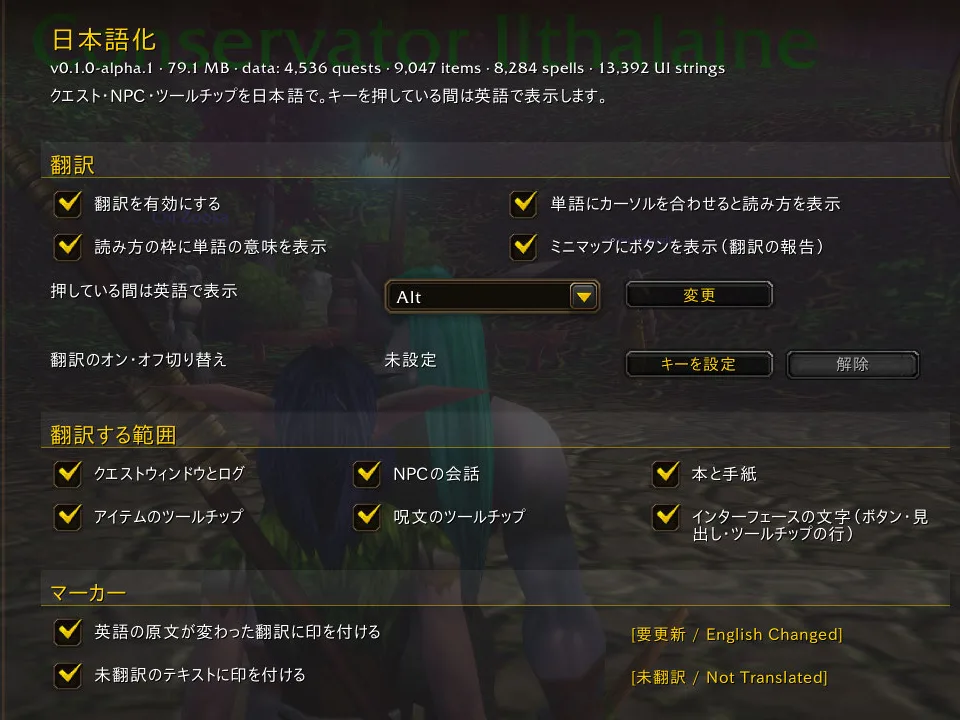
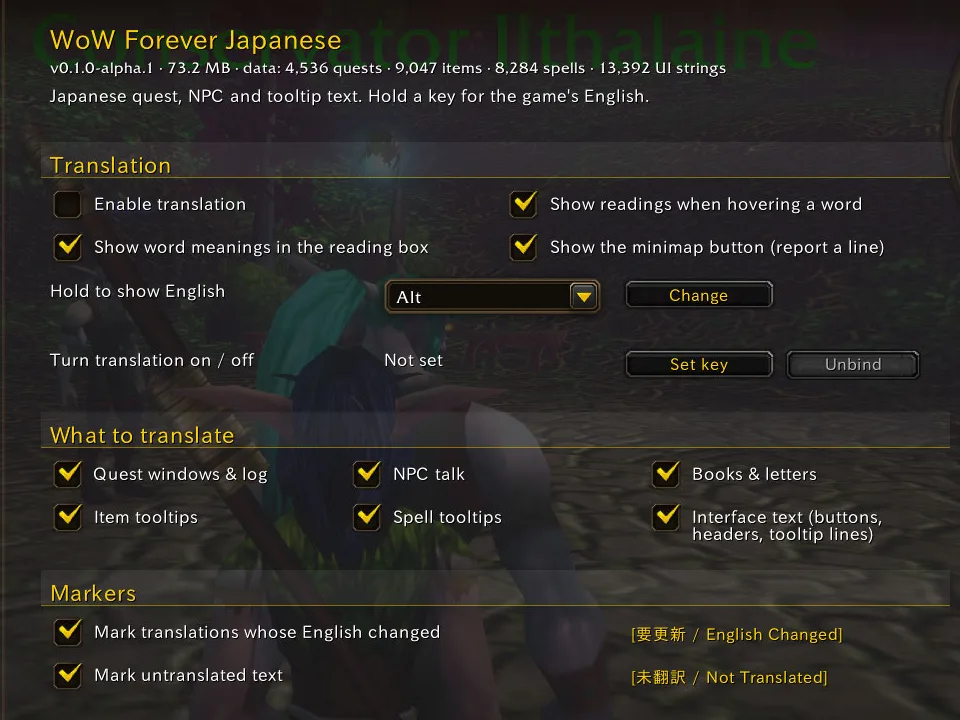
Turn the whole translation on or off, or each area on its own. Change the key you hold for English, set a key that switches translation on and off, and turn the markers, the popup dictionary and the minimap button on or off.

翻訳全体や項目ごとのオン・オフ、英語表示キーの変更、翻訳を切り替えるキーの設定、マーカー・ポップアップ辞書・ミニマップボタンの表示を切り替えられます。

Open Esc > Options > AddOns > WoW Forever Japanese, or type /wfj.

Esc > オプション > AddOns > WoW Forever Japanese、または /wfj で開きます。

The addon's settings page in English The addon's settings page in Japanese
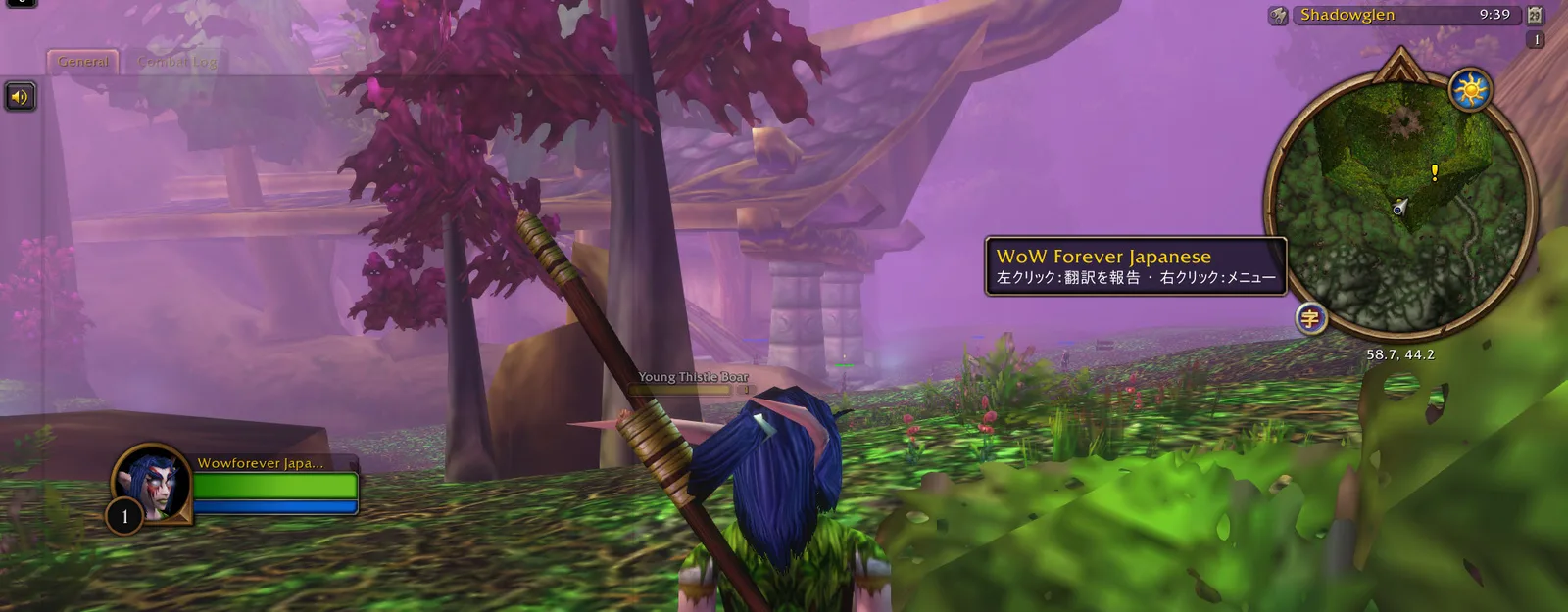
The game in Shadowglen, with the addon's 字 button on the minimap and its tooltip in Japanese

The same game, in Japanese いつものゲームを、日本語で

The windows, the buttons and the layout are the game's own. The addon changes the words.

ウィンドウもボタンも配置も、ゲームそのままです。変わるのは言葉だけです。

Install インストール

With the CurseForge appCurseForge アプリで

  1. Open the CurseForge app, choose World of Warcraft, and search for WoW Forever Japanese.
  2. Make sure your Forever install is the one selected at the top of the game page.
  3. Click Install.
  1. CurseForge アプリで World of Warcraft を選び、WoW Forever Japanese を検索します。
  2. ゲームのページ上部で Forever のインストール先が選ばれていることを確認します。
  3. Install を押します。

Open the CurseForge page CurseForge のページを開く

Turn it on in the gameゲーム内で有効にする

At the character select screen, click AddOns, make sure WoW Forever Japanese is ticked, and log in.

キャラクター選択画面で AddOns を押し、WoW Forever Japanese にチェックが入っていることを確認してからログインします。

The AddOns list at character select with WoW Forever Japanese ticked
Install by hand 手動でインストール
  1. Download the zip of the latest release from the releases page.
  2. Find your Forever client's folder: open the Battle.net app, choose World of Warcraft, pick the Forever version, and use Show in Explorer (Windows) or Show in Finder (macOS) from the gear menu next to the Play button. Inside it, open Interface, then AddOns (create AddOns if it is not there yet).
  3. Unzip the download into that AddOns folder.
  4. Check the folder name: AddOns must hold a folder called exactly WoWForeverJapanese, not a folder inside another folder.
  1. リリースページから最新版の zip をダウンロードします。
  2. Battle.net アプリで World of Warcraft を選び、Forever のバージョンを選んで、「プレイ」ボタン横の歯車メニューから エクスプローラーで表示(Windows)または Finder で表示(macOS)を開きます。その中の Interface、AddOns の順にフォルダを開きます(AddOns がなければ作成)。
  3. ダウンロードした zip をその AddOns フォルダに展開します。
  4. AddOns の中に WoWForeverJapanese という名前のフォルダがあることを確認します(フォルダの中にさらにフォルダが入っていないこと)。

Spotted a bad translation? おかしな翻訳を見つけたら

Report it from inside the game. If your Japanese is used, you are credited by the name you choose.

ゲームの中から報告できます。あなたの日本語が採用された場合は、指定した名前でクレジットに載ります。

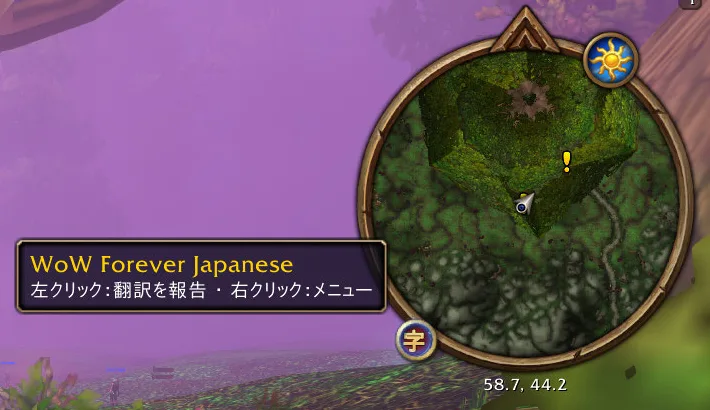
  1. The 字 button on the minimap and its tooltip

    Click the 字 button on the minimap, or type /wfj fix.

    ミニマップの 字 ボタン(または /wfj fix)を押します。

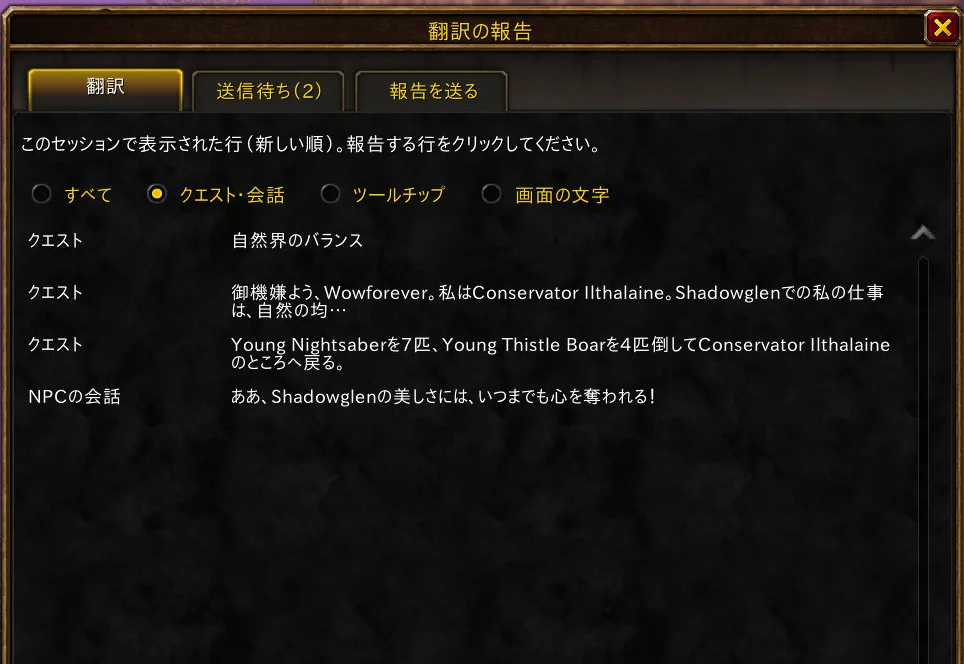
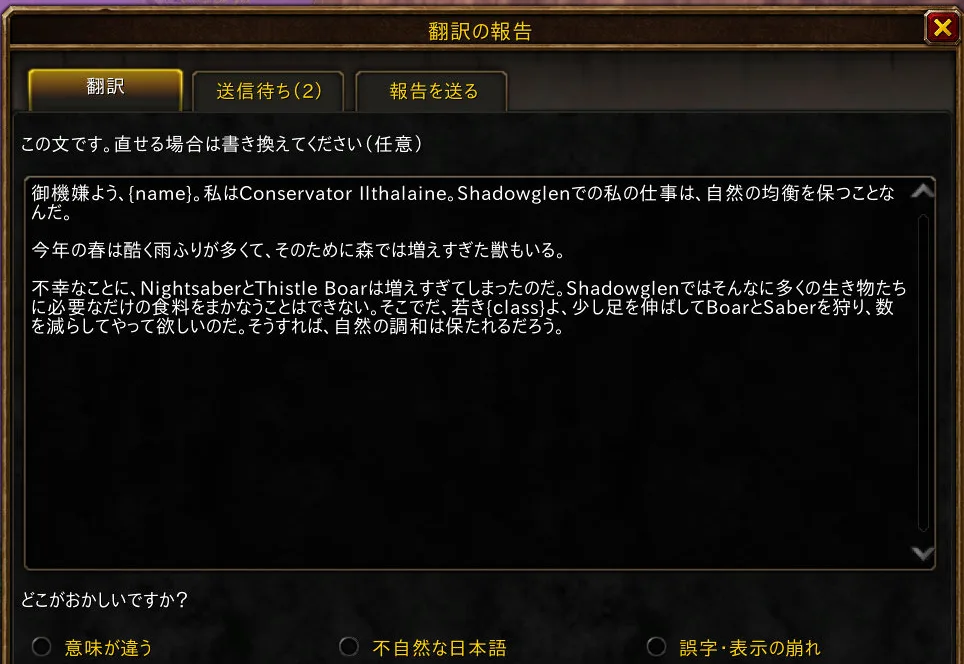
  2. The report window listing the lines just read

    Pick the line from the ones you just read.

    直前に読んだ行から選びます。

  3. The report window with a line picked and the reasons to choose from

    Choose what is wrong and, if you like, write a better Japanese line. Then open Send report, copy the report, and paste it into a translation report. A check answers in a comment within a minute. The issue and the credit are public.

    何が問題かを選びます。よりよい日本語を書くこともできます。続いて 報告を送る を開いて報告文をコピーし、翻訳の報告フォームに貼り付けます。1 分以内に自動チェックの結果がコメントされます(Issue とクレジットは公開されます)。

Credits クレジット

The hand-written translations are the work of the Japanese translators of WoWJapanizer, QuestJapanizer and CraftJapanizer_Quest, who are listed by name in ATTRIBUTION. Lines those projects did not cover are machine-drafted and marked as such in the data. Players whose fixes ship are credited in the same file.

手書きの翻訳は、WoWJapanizer、QuestJapanizer、CraftJapanizer_Quest の翻訳者の皆さんによるものです。翻訳者の名前は ATTRIBUTION に記載しています。これらのプロジェクトが扱っていない行は機械で下訳したもので、データ上でその旨を記録しています。報告から採用された修正の提供者も同じファイルに記載します。

The font bundled with the addon is IPA UI Gothic, under the IPA Font License v1.0. The titles on this page are set in Cinzel, under the SIL Open Font License.

アドオンに同梱のフォントは IPA UI ゴシック(IPA フォントライセンス v1.0)です。このページの見出しには Cinzel(SIL Open Font License)を使っています。